Web — TypeScript and React (Next.js)
These are the steps to set up and run a simple TypeScript Web app that calls into a shared core.
This walk-through assumes you have already set up the
shared library and codegen as described in
Shared core and types.
Create a Next.js App
For this walk-through, we'll use the
pnpm package manager for no
reason other than we like it the most!
Let's create a simple Next.js app for TypeScript,
using pnpx (from pnpm). You can probably accept
the defaults.
pnpx create-next-app@latest
Compile our Rust shared library
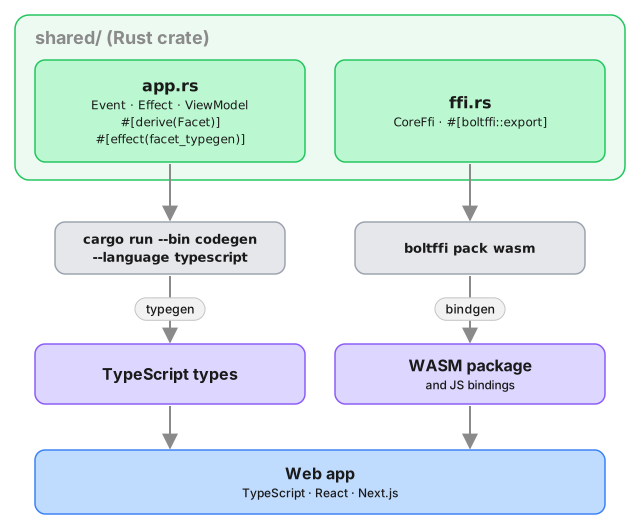
When we build our app, we also want to compile the Rust core to WebAssembly so that it can be referenced from our code.
To do this, we'll use BoltFFI, which you can install like this:
cargo install boltffi_cli --version '=0.30.1' --locked
brew install binaryen # provides wasm-opt
The crate is boltffi_cli; it installs the boltffi binary used below.
Binaryen must be version 123 or newer — BoltFFI passes --enable-bulk-memory-opt
to wasm-opt, which older releases don't understand. Check with
wasm-opt --version; distribution packages are often well behind, so prefer a
release from GitHub if your
package manager ships something older.
Now that we have boltffi installed, we can build
our shared library to WebAssembly for the browser.
cd ../shared
boltffi pack wasm
Generate the Shared Types
To generate the shared types for TypeScript, we use the codegen CLI we prepared earlier:
cargo run --package shared --bin codegen \
    --features codegen,facet_typegen \
    -- --language typescript \
       --output-dir generated/types
Both the Wasm package and the generated types are
referenced as local dependencies in package.json:
{
  "dependencies": {
    "shared": "file:generated/pkg",
    "shared_types": "file:generated/types"
  }
}
Install the dependencies:
pnpm install
Create some UI
Counter example
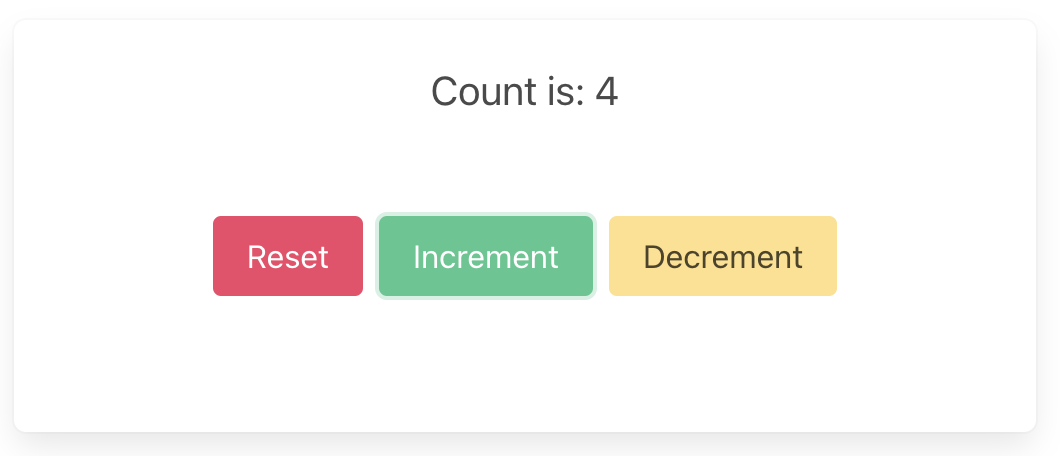
A simple app that increments, decrements and resets a counter.
Wrap the core to handle effects
First, let's add some boilerplate code to wrap our core
and handle the effects that it produces. For this
example, we only need to support the Render effect,
which triggers a render of the UI.
This code that wraps the core only needs to be written once — it only grows when we need to support additional effects.
Edit src/app/core.ts to look like the following.
This code sends our (UI-generated) events to the core,
and handles any effects that the core asks for. In this
example, we aren't calling any HTTP APIs or handling
any side effects other than rendering the UI, so we
just handle this render effect by updating the
component's view hook with the core's ViewModel.
Notice that we have to serialize and deserialize the data that we pass between the core and the shell. This is because the core is running in a separate WebAssembly instance, and so we can't just pass the data directly.
import type { Dispatch, SetStateAction } from "react";
import { CoreFfi } from "shared";
import * as sharedWasm from "shared";
import type { Effect, Event } from "shared_types/app";
import {
  serializeEvent,
  matchEffect,
  Request,
  ViewModel,
} from "shared_types/app";
import { BincodeDeserializer, BincodeSerializer } from "shared_types/bincode";

const wasmInitialized = (
  sharedWasm as unknown as { initialized: Promise<void> }
).initialized;

export class Core {
  core: CoreFfi | null = null;
  initializing: Promise<void> | null = null;
  setState: Dispatch<SetStateAction<ViewModel>>;

  constructor(setState: Dispatch<SetStateAction<ViewModel>>) {
    // Don't initialize CoreFfi here - wait for WASM to be loaded
    this.setState = setState;
  }

  initialize(shouldLoad: boolean): Promise<void> {
    if (this.core) {
      return Promise.resolve();
    }

    if (!this.initializing) {
      const load = shouldLoad ? wasmInitialized : Promise.resolve();

      this.initializing = load
        .then(() => {
          this.core = CoreFfi.new();
          this.setState(this.view());
        })
        .catch((error) => {
          this.initializing = null;
          console.error("Failed to initialize wasm core:", error);
        });
    }

    return this.initializing;
  }

  view(): ViewModel {
    if (!this.core) {
      throw new Error("Core not initialized. Call initialize() first.");
    }
    return deserializeView(this.core.view());
  }

  update(event: Event) {
    if (!this.core) {
      throw new Error("Core not initialized. Call initialize() first.");
    }
    const serializer = new BincodeSerializer();
    serializeEvent(event, serializer);

    const effects = this.core.update(serializer.getBytes());

    const requests = deserializeRequests(effects);
    for (const { effect } of requests) {
      this.processEffect(effect);
    }
  }

  private processEffect(effect: Effect) {
    matchEffect(effect, {
      Render: () => this.setState(this.view()),
    });
  }
}

function deserializeRequests(bytes: Uint8Array | number[]): Request[] {
  const deserializer = new BincodeDeserializer(asBytes(bytes));
  const len = deserializer.deserializeLen();
  const requests: Request[] = [];
  for (let i = 0; i < len; i++) {
    const request = Request.deserialize(deserializer);
    requests.push(request);
  }
  return requests;
}

function deserializeView(bytes: Uint8Array | number[]): ViewModel {
  return ViewModel.deserialize(new BincodeDeserializer(asBytes(bytes)));
}

function asBytes(bytes: Uint8Array | number[]): Uint8Array {
  return bytes instanceof Uint8Array ? bytes : new Uint8Array(bytes);
}
That switch statement, above, is where you would
handle any other effects that your core might ask for.
For example, if your core needs to make an HTTP
request, you would handle that here. To see an example
of this, take a look at the
counter example
in the Crux repository.
Create a component to render the UI
Edit src/app/page.tsx to look like the following.
This code loads the WebAssembly core and sends it an
initial event. Notice that we pass the setState hook
to the update function so that we can update the state
in response to a render effect from the core.
"use client";

import type { NextPage } from "next";
import { useEffect, useRef, useState } from "react";

import {
  ViewModel,
  eventReset,
  eventIncrement,
  eventDecrement,
} from "shared_types/app";

import { Core } from "./core";

const Home: NextPage = () => {
  const [view, setView] = useState(new ViewModel(""));
  const core = useRef(new Core(setView));

  useEffect(() => {
    void core.current.initialize(true);
  }, []);

  return (
    <main>
      <section className="box container has-text-centered m-5">
        <p className="is-size-5">{view.count}</p>
        <div className="buttons section is-centered">
          <button
            className="button is-primary is-danger"
            onClick={() => core.current.update(eventReset())}
          >
            {"Reset"}
          </button>
          <button
            className="button is-primary is-success"
            onClick={() => core.current.update(eventIncrement())}
          >
            {"Increment"}
          </button>
          <button
            className="button is-primary is-warning"
            onClick={() => core.current.update(eventDecrement())}
          >
            {"Decrement"}
          </button>
        </div>
      </section>
    </main>
  );
};

export default Home;
Now all we need is some CSS. First add the Bulma
package, and then import it in layout.tsx.
pnpm add bulma
import "bulma/css/bulma.min.css";
import type { Metadata } from "next";
import { Inter } from "next/font/google";

const inter = Inter({ subsets: ["latin"] });

export const metadata: Metadata = {
  title: "Crux Simple Counter Example",
  description: "Rust Core, TypeScript Shell (NextJS)",
};

export default function RootLayout({
  children,
}: {
  children: React.ReactNode;
}) {
  return (
    <html lang="en">
      <body className={inter.className}>{children}</body>
    </html>
  );
}
Build and serve our app
We can build our app, and serve it for the browser, in one simple step.
pnpm dev