Android — Kotlin and Jetpack Compose
This section has not been fully updated to match the rest of the documentation and some parts may not match how Crux works any more.
Bear with us while we update — use the iOS/macOS section as the most up-to-date template to follow.
When we use Crux to build Android apps, the Core API bindings are generated in Kotlin using Mozilla's UniFFI.
The shared core (that contains our app's behaviour) is compiled to a dynamic library, using Mozilla's Rust gradle plugin for Android and the Android NDK. The library is loaded at runtime using Java Native Access.
The shared types are generated by Crux as Kotlin packages, which we
can add to our Android project using sourceSets. The Kotlin code
to serialise and deserialise these types across the boundary is also
generated by Crux.
These are the steps to set up Android Studio to build and run a simple Android app that calls into a shared core.
We want to make setting up Android Studio to work with Crux really easy. As time progresses we will try to simplify and automate as much as possible, but at the moment there is some manual configuration to do. This only needs doing once, so we hope it's not too much trouble. If you know of any better ways than those we describe below, please either raise an issue (or a PR) at https://github.com/redbadger/crux.
This walkthrough uses Mozilla's excellent Rust gradle plugin
for Android, which uses Python. However, pipes has recently been removed from Python (since Python 3.13)
so you may encounter an error linking your shared library.
If you hit this problem, you can either:
- use an older Python (<3.13)
- wait for a fix (see this issue)
- or use a different plugin — there is a PR in the Crux repo that
explores the use of
cargo-ndkand thecargo-ndk-androidplugin that may be useful.
Create an Android App
The first thing we need to do is create a new Android app in Android Studio.
Open Android Studio and create a new project, for "Phone and Tablet", of type "Empty Activity". In this walk-through, we'll call it "SimpleCounter"
- "Name":
SimpleCounter - "Package name":
com.example.counter - "Save Location": a directory called
Androidat the root of our monorepo - "Minimum SDK"
API 34 - "Build configuration language":
Kotlin DSL (build.gradle.kts)
Your repo's directory structure might now look something like this (some files elided):
.
├── Android
│  ├── app
│  │  ├── build.gradle.kts
│  │  └── src
│  │     └── main
│  │        ├── AndroidManifest.xml
│  │        └── java/com/crux/examples/counter
│  │           ├── Core.kt
│  │           └── MainActivity.kt
│  ├── build.gradle.kts
│  ├── gradle.properties
│  ├── settings.gradle.kts
│  └── shared
│     └── build.gradle.kts
├── Cargo.lock
├── Cargo.toml
└── shared
   ├── Cargo.toml
   ├── uniffi.toml
   └── src
      ├── app.rs
      ├── bin
      │  └── codegen.rs
      ├── ffi.rs
      └── lib.rs
Add a Kotlin Android Library
This shared Android library (aar) is going to wrap our shared Rust library.
Under File -> New -> New Module, choose "Android Library" and give it the "Module name"
shared. Set the "Package name" to match the one from your
/shared/uniffi.toml, which in this example is com.example.counter.shared.
Again, set the "Build configuration language" to Kotlin DSL (build.gradle.kts).
For more information on how to add an Android library see https://developer.android.com/studio/projects/android-library.
We can now add this library as a dependency of our app.
Edit the app's build.gradle.kts (/Android/app/build.gradle.kts) to look like
this:
import org.jetbrains.kotlin.gradle.dsl.JvmTarget

plugins {
    alias(libs.plugins.android.application)
    alias(libs.plugins.kotlin.android)
    alias(libs.plugins.kotlin.compose)
}

android {
    namespace = "com.crux.examples.counter"
    compileSdk {
        version = release(36)
    }

    defaultConfig {
        applicationId = "com.crux.examples.counter"
        minSdk = 34
        targetSdk = 36
        versionCode = 1
        versionName = "1.0"

        testInstrumentationRunner = "androidx.test.runner.AndroidJUnitRunner"
    }

    buildTypes {
        release {
            isMinifyEnabled = false
            proguardFiles(
                getDefaultProguardFile("proguard-android-optimize.txt"),
                "proguard-rules.pro"
            )
        }
    }
    compileOptions {
        sourceCompatibility = JavaVersion.VERSION_11
        targetCompatibility = JavaVersion.VERSION_11
    }
    kotlin {
        compilerOptions {
            jvmTarget = JvmTarget.JVM_11
        }
    }
    buildFeatures {
        compose = true
    }
}

dependencies {
    // our shared library
    implementation(project(":shared"))

    // added dependencies
    implementation(libs.lifecycle.viewmodel.compose)

    // original dependencies
    implementation(libs.androidx.core.ktx)
    implementation(libs.androidx.lifecycle.runtime.ktx)
    implementation(libs.androidx.activity.compose)
    implementation(platform(libs.androidx.compose.bom))
    implementation(libs.androidx.compose.ui)
    implementation(libs.androidx.compose.ui.graphics)
    implementation(libs.androidx.compose.ui.tooling.preview)
    implementation(libs.androidx.compose.material3)
    testImplementation(libs.junit)
    androidTestImplementation(libs.androidx.junit)
    androidTestImplementation(libs.androidx.espresso.core)
    androidTestImplementation(platform(libs.androidx.compose.bom))
    androidTestImplementation(libs.androidx.compose.ui.test.junit4)
    debugImplementation(libs.androidx.compose.ui.tooling)
    debugImplementation(libs.androidx.compose.ui.test.manifest)
}
In our Gradle files, we are referencing a "Version Catalog" to manage our dependency versions, so you will need to ensure this is kept up to date.
Our catalog (Android/gradle/libs.versions.toml) will end up looking like this:
[versions]
agp = "8.13.2"
kotlin = "2.3.0"
coreKtx = "1.17.0"
junit = "4.13.2"
junitVersion = "1.3.0"
espressoCore = "3.7.0"
lifecycleRuntimeKtx = "2.10.0"
activityCompose = "1.12.3"
composeBom = "2026.01.01"
jna = "5.18.1"
lifecycle = "2.10.0"
rustAndroid = "0.9.6"

[libraries]
androidx-core-ktx = { group = "androidx.core", name = "core-ktx", version.ref = "coreKtx" }
junit = { group = "junit", name = "junit", version.ref = "junit" }
androidx-junit = { group = "androidx.test.ext", name = "junit", version.ref = "junitVersion" }
androidx-espresso-core = { group = "androidx.test.espresso", name = "espresso-core", version.ref = "espressoCore" }
androidx-lifecycle-runtime-ktx = { group = "androidx.lifecycle", name = "lifecycle-runtime-ktx", version.ref = "lifecycleRuntimeKtx" }
androidx-activity-compose = { group = "androidx.activity", name = "activity-compose", version.ref = "activityCompose" }
androidx-compose-bom = { group = "androidx.compose", name = "compose-bom", version.ref = "composeBom" }
androidx-compose-ui = { group = "androidx.compose.ui", name = "ui" }
androidx-compose-ui-graphics = { group = "androidx.compose.ui", name = "ui-graphics" }
androidx-compose-ui-tooling = { group = "androidx.compose.ui", name = "ui-tooling" }
androidx-compose-ui-tooling-preview = { group = "androidx.compose.ui", name = "ui-tooling-preview" }
androidx-compose-ui-test-manifest = { group = "androidx.compose.ui", name = "ui-test-manifest" }
androidx-compose-ui-test-junit4 = { group = "androidx.compose.ui", name = "ui-test-junit4" }
androidx-compose-material3 = { group = "androidx.compose.material3", name = "material3" }
jna = { module = "net.java.dev.jna:jna", version.ref = "jna" }
lifecycle-viewmodel-compose = { module = "androidx.lifecycle:lifecycle-viewmodel-compose", version.ref = "lifecycle" }

[plugins]
android-application = { id = "com.android.application", version.ref = "agp" }
kotlin-android = { id = "org.jetbrains.kotlin.android", version.ref = "kotlin" }
kotlin-compose = { id = "org.jetbrains.kotlin.plugin.compose", version.ref = "kotlin" }
android-library = { id = "com.android.library", version.ref = "agp" }
rust-android = { id = "org.mozilla.rust-android-gradle.rust-android", version.ref = "rustAndroid" }
The Rust shared library
We'll use the following tools to incorporate our Rust shared library into the Android library added above. This includes compiling and linking the Rust dynamic library and generating the runtime bindings and the shared types.
- The Android NDK
- Mozilla's Rust gradle plugin
for Android
- This plugin depends on Python 3, make sure you have a version installed
- Java Native Access
- Uniffi to generate Java bindings
The NDK can be installed from "Tools, SDK Manager, SDK Tools" in Android Studio.
Let's get started.
Add the four rust android toolchains to your system:
$ rustup target add aarch64-linux-android armv7-linux-androideabi i686-linux-android x86_64-linux-android
Edit the project's build.gradle.kts (/Android/build.gradle.kts) to look like
this:
// Top-level build file where you can add configuration options common to all sub-projects/modules.
plugins {
    alias(libs.plugins.android.application) apply false
    alias(libs.plugins.kotlin.android) apply false
    alias(libs.plugins.kotlin.compose) apply false
    alias(libs.plugins.android.library) apply false
    alias(libs.plugins.rust.android) apply false
}
Edit the library's build.gradle.kts (/Android/shared/build.gradle.kts) to look
like this:
import com.android.build.gradle.tasks.MergeSourceSetFolders
import com.nishtahir.CargoBuildTask
import com.nishtahir.CargoExtension
import org.jetbrains.kotlin.gradle.dsl.JvmTarget

plugins {
    alias(libs.plugins.android.library)
    alias(libs.plugins.kotlin.android)
    alias(libs.plugins.rust.android)
}

android {
    namespace = "com.crux.examples.counter"

    compileSdk {
        version = release(36)
    }

    ndkVersion = "29.0.14206865"

    defaultConfig {
        minSdk = 34
    }

    compileOptions {
        sourceCompatibility = JavaVersion.VERSION_11
        targetCompatibility = JavaVersion.VERSION_11
    }

    kotlin {
        compilerOptions {
            jvmTarget = JvmTarget.JVM_11
        }
    }

    sourceSets {
        getByName("main") {
            // types are now generated in kotlin
            kotlin.srcDirs("${projectDir}/../generated")
        }
    }
}

dependencies {
    implementation(libs.jna) {
        artifact {
            type = "aar"
        }
    }
}

extensions.configure<CargoExtension>("cargo") {
    // workspace, so build at root, with `--package shared`
    module = "../.."
    libname = "shared"
    profile = "debug"
    // these are the four recommended targets for Android that will ensure your library works on all mainline android devices
    // make sure you have included the rust toolchain for each of these targets: \
    // `rustup target add aarch64-linux-android armv7-linux-androideabi i686-linux-android x86_64-linux-android`
    targets = listOf("arm", "arm64", "x86", "x86_64")
    extraCargoBuildArguments = listOf("--package", "shared", "--features", "uniffi")
    cargoCommand = System.getProperty("user.home") + "/.cargo/bin/cargo"
    rustcCommand = System.getProperty("user.home") + "/.cargo/bin/rustc"
    pythonCommand = "python3"
}

afterEvaluate {
    // The `cargoBuild` task isn't available until after evaluation.
    android.libraryVariants.configureEach {
        var productFlavor = ""
        productFlavors.forEach { flavor ->
            productFlavor += flavor.name.replaceFirstChar { char -> char.uppercaseChar() }
        }
        val buildType = buildType.name.replaceFirstChar { char -> char.uppercaseChar() }

        tasks.named("generate${productFlavor}${buildType}Assets") {
            dependsOn(tasks.named("cargoBuild"))
        }

        // The below dependsOn is needed till https://github.com/mozilla/rust-android-gradle/issues/85 is resolved this fix was got from #118
        tasks.withType<CargoBuildTask>().forEach { buildTask ->
            tasks.withType<MergeSourceSetFolders>().configureEach {
                inputs.dir(
                    File(
                        File(layout.buildDirectory.asFile.get(), "rustJniLibs"),
                        buildTask.toolchain?.folder!!
                    )
                )
                dependsOn(buildTask)
            }
        }
    }
}

// The below dependsOn is needed till https://github.com/mozilla/rust-android-gradle/issues/85 is resolved this fix was got from #118
tasks.matching { it.name.matches(Regex("merge.*JniLibFolders")) }.configureEach {
    inputs.dir(File(layout.buildDirectory.asFile.get(), "rustJniLibs/android"))
    dependsOn("cargoBuild")
}
You will need to set the ndkVersion to one you have installed, go to "Tools, SDK Manager, SDK Tools" and check "Show Package Details" to get your installed version, or to install the version matching build.gradle.kts above.
If you now build your project you should see the newly built shared library object file.
$ ls --tree Android/shared/build/rustJniLibs
Android/shared/build/rustJniLibs
└── android
   └── arm64-v8a
      └── libshared.so
   └── armeabi-v7a
      └── libshared.so
   └── x86
      └── libshared.so
   └── x86_64
      └── libshared.so
You should also see the generated types in the Android/generated
folder — note that the sourceSets directive in the shared library
gradle file (above) allows us to build our shared library against
these generated types.
$ ls --tree Android/generated
Android/generated
└── com
   ├── crux
   │  └── examples
   │     └── simplecounter
   │        ├── Requests.kt
   │        ├── shared.kt
   │        └── Simplecounter.kt
   └── novi
      ├── bincode
      │  ├── BincodeDeserializer.kt
      │  └── BincodeSerializer.kt
      └── serde
         ├── BinaryDeserializer.kt
         ├── BinarySerializer.kt
         ├── ...
         └── Unsigned.kt
Create some UI and run in the Simulator
Wrap the core to support capabilities
First, let's add some boilerplate code to wrap our core and handle the
capabilities that we are using. For this example, we only need to support the
Render capability, which triggers a render of the UI.
Let's create a file "File, New, Kotlin Class/File, File" called Core.
This code that wraps the core only needs to be written once — it only grows when we need to support additional capabilities.
Edit Android/app/src/main/java/com/crux/examples/counter/Core.kt to look like
the following. This code sends our (UI-generated) events to the core, and
handles any effects that the core asks for. In this simple example, we aren't
calling any HTTP APIs or handling any side effects other than rendering the UI,
so we just handle this render effect by updating the published view model from
the core.
package com.crux.examples.counter

import androidx.compose.runtime.getValue
import androidx.compose.runtime.mutableStateOf
import androidx.compose.runtime.setValue
open class Core : androidx.lifecycle.ViewModel() {
    private var core: CoreFfi = CoreFfi()

    var view: ViewModel by mutableStateOf(
        ViewModel.bincodeDeserialize(core.view())
    )
        private set

    fun update(event: Event) {
        val effects = core.update(event.bincodeSerialize())

        val requests = Requests.bincodeDeserialize(effects).value
        for (request in requests) {
            processEffect(request)
        }
    }

    private fun processEffect(request: Request) {
        when (val effect = request.effect) {
            is Effect.Render -> {
                this.view = ViewModel.bincodeDeserialize(core.view())
            }
        }
    }
}
That when statement, above, is where you would handle any other
effects that your core might ask for. For example, if your core needs
to make an HTTP request, you would handle that here.
Edit /Android/app/src/main/java/com/crux/examples/counter/MainActivity.kt to
look like the following:
package com.crux.examples.counter

import android.os.Bundle
import androidx.activity.ComponentActivity
import androidx.activity.compose.setContent
import androidx.compose.foundation.layout.Arrangement
import androidx.compose.foundation.layout.Column
import androidx.compose.foundation.layout.Row
import androidx.compose.foundation.layout.fillMaxSize
import androidx.compose.foundation.layout.padding
import androidx.compose.material3.Button
import androidx.compose.material3.ButtonDefaults
import androidx.compose.material3.MaterialTheme
import androidx.compose.material3.Surface
import androidx.compose.material3.Text
import androidx.compose.runtime.Composable
import androidx.compose.runtime.rememberCoroutineScope
import androidx.compose.ui.Alignment
import androidx.compose.ui.Modifier
import androidx.compose.ui.graphics.Color
import androidx.compose.ui.tooling.preview.Preview
import androidx.compose.ui.unit.dp
import androidx.lifecycle.viewmodel.compose.viewModel
import com.crux.examples.counter.ui.theme.CounterTheme
import kotlinx.coroutines.launch

class MainActivity : ComponentActivity() {
    override fun onCreate(savedInstanceState: Bundle?) {
        super.onCreate(savedInstanceState)
        setContent {
            CounterTheme {
                Surface(
                    modifier = Modifier.fillMaxSize(),
                    color = MaterialTheme.colorScheme.background
                ) { View() }
            }
        }
    }
}

@Composable
fun View(core: Core = viewModel()) {
    val scope = rememberCoroutineScope()
    Column(
        horizontalAlignment = Alignment.CenterHorizontally,
        verticalArrangement = Arrangement.Center,
        modifier = Modifier.fillMaxSize().padding(10.dp),
    ) {
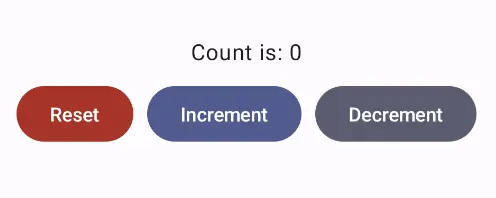
        Text(text = core.view.count, modifier = Modifier.padding(10.dp))
        Row(horizontalArrangement = Arrangement.spacedBy(10.dp)) {
            Button(
                onClick = { scope.launch { core.update(Event.RESET) } },
                colors =
                    ButtonDefaults.buttonColors(
                        containerColor = MaterialTheme.colorScheme.error
                    )
            ) { Text(text = "Reset", color = Color.White) }
            Button(
                onClick = { scope.launch { core.update(Event.INCREMENT) } },
                colors =
                    ButtonDefaults.buttonColors(
                        containerColor = MaterialTheme.colorScheme.primary
                    )
            ) { Text(text = "Increment", color = Color.White) }
            Button(
                onClick = { scope.launch { core.update(Event.DECREMENT) } },
                colors =
                    ButtonDefaults.buttonColors(
                        containerColor = MaterialTheme.colorScheme.secondary
                    )
            ) { Text(text = "Decrement", color = Color.White) }
        }
    }
}

@Preview(showBackground = true)
@Composable
fun DefaultPreview() {
    CounterTheme { View() }
}