Type generation
Why type generation?
Declaring every type across an FFI boundary is painful. Complex types like nested enums, generics, and rich view models are awkward to expose directly through general-purpose FFI binding tools. And even when you can declare them, maintaining the declarations by hand as your app evolves is tedious and error-prone.
Crux sidesteps this problem by keeping the FFI surface as small as
possible. The entire core-shell interface is just three methods —
update, resolve, and view — and all data crosses the boundary as
serialized byte arrays (using bincode). The
shell doesn't need to know the Rust types at the FFI level at all.
BoltFFI gives Crux the bindings for that byte-oriented API, but it doesn't remove the need for generated shell types. Two constraints matter here:
- Shell types should be immutable value types. Rust-backed FFI objects can make ownership and mutation part of the UI boundary; immutability is still being worked through in boltffi#292.
- Shells need to connect view models to UI-native state mechanisms:
Swift
@Observable, KotlinStateFlow, TypeScript framework state such as ReactuseState, and C#INotifyPropertyChanged/ObservableObject. Those APIs expect native values or native observable wrappers, not Rust-backed objects.
Crux is still exploring where those responsibilities should sit, and
whether difficient
can reduce the payload over the wire by sending changes instead of
whole values. For now, type generation is the stable layer that gives
shells native value types while the FFI stays small.
That generated layer has a concrete job: the shell must serialize
events and deserialize effects and view models on its side of the
boundary. To do that, it needs equivalent type definitions in Swift,
Kotlin, TypeScript, or C#, along with the matching serialization code.
Type generation inspects your Rust types and generates those foreign
types and their bincode serialization implementations automatically.
How it works
Type generation uses the Facet crate for
zero-cost reflection. Types that derive the Facet trait can be
introspected at build time to discover their shape — fields, variants,
generic parameters. The
facet-generate crate
uses that reflection data to generate equivalent types (and their
serialization code) in Swift, Kotlin, TypeScript, and C#.
The process has three parts:
- Annotate your types — derive
Faceton types that cross the FFI boundary, and use#[effect(facet_typegen)]on yourEffectenum. - Add a codegen binary to your shared crate — a short
mainthat registers your app and generates the foreign code. - Run it — typically via a
just typegenrecipe as part of your build workflow.
Annotating your types
Events, ViewModel, and other data types
Types that the shell needs to know about should derive Facet (along
with Serialize and Deserialize for the FFI serialization). Here's
the counter example:
#[derive(Facet, Serialize, Deserialize, Clone, Debug)]
#[repr(C)]
pub enum Event {
    Increment,
    Decrement,
    Reset,
}
#[derive(Facet, Serialize, Deserialize, Clone, Default)]
pub struct ViewModel {
pub count: String,
}Note the #[repr(C)] on the enum — this is required by Facet for
enums that cross the FFI boundary.
The Effect type
The Effect enum uses the #[effect(facet_typegen)] attribute, which
tells the #[effect] macro to generate the type registration code
that the codegen binary needs:
#[effect(facet_typegen)]
#[derive(Debug)]
pub enum Effect {
    Render(RenderOperation),
}
The macro discovers the operation types carried by each variant (e.g.
RenderOperation) and registers them for type generation
automatically. It also records, per variant, the operation kind the
operation declares and the Format of its Output — that's the data
behind the operation kinds and handler API
below.
Skipping and opaque types
Not all event variants need to cross the FFI boundary. Internal
events (ones the shell never sends) can be excluded from the generated
output with #[facet(skip)]:
#[derive(Facet, Serialize, Deserialize, Clone, Debug, PartialEq, Eq)]
#[repr(C)]
pub enum Event {
    // events from the shell
    Get,
    Increment,
    Decrement,
    Random,
    StartWatch,

    // events local to the core
    #[serde(skip)]
    #[facet(skip)]
    Set(#[facet(opaque)] crux_http::Result<crux_http::Response<Count>>),

    #[serde(skip)]
    #[facet(skip)]
    Update(Count),

    #[serde(skip)]
    #[facet(skip)]
    UpdateBy(isize),
}
In this example, Set, Update, and UpdateBy are internal events
— the shell never creates them, so they're skipped.
However, Facet must still be derivable on the entire type,
including skipped variants. If a skipped variant contains a field
whose type doesn't implement Facet (like crux_http::Result<...>),
you need to mark that field with #[facet(opaque)] so the derive
succeeds. That's why Set has both #[facet(skip)] on the variant
and #[facet(opaque)] on its field.
The codegen binary
Each shared crate includes a small binary that drives the type generation. Here's the one from the counter example:
use std::path::PathBuf;

use anyhow::Result;
use clap::{Parser, ValueEnum};
use crux_core::type_generation::facet::{Config, TypeRegistry};
use log::info;

use shared::Counter;

#[derive(Copy, Clone, PartialEq, Eq, PartialOrd, Ord, ValueEnum)]
enum Language {
    Swift,
    Kotlin,
    Csharp,
    Typescript,
}

#[derive(Parser)]
#[command(version, about, long_about = None)]
struct Args {
    #[arg(short, long, value_enum)]
    language: Language,
    #[arg(short, long)]
    output_dir: PathBuf,
}

fn main() -> Result<()> {
    pretty_env_logger::init();
    let args = Args::parse();

    let typegen_app = TypeRegistry::new().register_app::<Counter>()?.build()?;

    let name = match args.language {
        Language::Swift => "App",
        Language::Kotlin => "com.crux.examples.counter",
        Language::Csharp => "CounterApp.Shared",
        Language::Typescript => "app",
    };
    let config = Config::builder(name, &args.output_dir).build();

    match args.language {
        Language::Swift => {
            info!("Typegen for Swift");
            typegen_app.swift(&config)?;
        }
        Language::Kotlin => {
            info!("Typegen for Kotlin");
            typegen_app.kotlin(&config)?;
        }
        Language::Csharp => {
            info!("Typegen for C#");
            typegen_app.csharp(&config)?;
        }
        Language::Typescript => {
            info!("Typegen for TypeScript");
            typegen_app.typescript(&config)?;
        }
    }

    Ok(())
}
The key steps are:
TypeRegistry::new().register_app::<Counter>()?— discovers all types reachable from yourAppimplementation (events, effects, view model, and the operation types they reference)..build()?— produces aCodeGeneratorwith the full type graph.Config::builder(name, &output_dir)— configures the output. Thenameparameter is the package/module name (e.g."App"for Swift,"com.crux.examples.counter"for Kotlin,"app"for TypeScript,"CounterApp.Shared"for C#)..swift(&config)?/.kotlin(&config)?/.typescript(&config)?/.csharp(&config)?— generates the code, including the target-language serialization runtime forbincode.
BoltFFI binding generation is run separately by the shell build recipes with
boltffi pack .... The codegen binary is intentionally focused on Crux app
types; the one thing it can be told about BoltFFI is where its output
lives, with .boltffi(BoltFfi::new()...) on the CodeGenerator, so that
the generated Core can be constructed over it without a hand-written
adapter — see Bridging to BoltFFI.
Cargo.toml setup
The codegen binary needs a few additions to your shared/Cargo.toml.
Declare the binary, gated on a codegen feature:
[[bin]]
name = "codegen"
required-features = ["codegen"]
Enable facet_typegen in crux_core:
[features]
facet_typegen = ["crux_core/facet_typegen"]
And add facet as a dependency — all types that cross the FFI
boundary derive Facet:
[dependencies]
facet = { version = "=0.46.5", features = ["chrono"] }
Running type generation
Type generation is typically run via Just
recipes. Each shell runs the codegen binary and writes the output into
a generated/ directory inside itself. In the counter example, the
layout looks like this:
examples/counter/
├── shared/            # the Crux core
├── apple/
│   └── generated/     # Swift package "App"
├── Android/
│   └── generated/     # Kotlin package "com.crux.examples.counter"
├── web-react-router/
│   └── generated/
│       └── types/     # TypeScript package "app"
└── ...
The package names are set in codegen.rs via the Config::builder
call — see the codegen binary above.
Each shell's Justfile has a typegen recipe. For example, the Apple
shell runs:
RUST_LOG=info cargo run \
    --package shared \
    --bin codegen \
    --features codegen,facet_typegen \
    -- \
        --language swift \
        --output-dir generated
The --output-dir is relative to the shell directory where the recipe
runs — so the generated code lands right where the shell project can
reference it. The TypeScript shells use generated/types to keep the
types separate from the wasm package (which lives in generated/pkg).
The generated/ directories are gitignored and regenerated as part of
the build process. Each shell's build recipe depends on typegen, and
where the codegen is configured to bridge to BoltFFI, typegen in turn
depends on the boltffi pack recipe, because the generated package
refers to BoltFFI's.
What gets generated
For each target language, the codegen produces:
- Type definitions — enums, structs, and their serialization code,
matching the shape of your Rust types. For example,
Event,Effect,ViewModel, and any operation types. - Serialization runtime — Serde and
bincodeimplementations in the target language, so the shell can serialize events and deserialize effects and view models. - Helper extensions — like
Requests.swift, which provides convenience methods for working with effect requests. - An operation-kind accessor, a typed effect handler API and a
Corethat drives the loop — see the next sections.
For Swift, Kotlin, TypeScript, and C#, this typegen output sits beside the BoltFFI-generated binding package for the byte-oriented core API.
Operation kinds and the effect handler API
A shell holding a Request { id, effect } has to know two things that
are not in the bytes: what type to answer with, and how many times.
Both are static properties of the operation each Effect variant
carries — an operation declares a
operation kind, notify,
request or stream, and one Output — so type generation emits them.
Next to the generated Effect, you get:
- an
OperationKindtype and a per-variant accessor, which isnil/null/undefinedfor an operation that declares no kind; - an
EffectHandlerprotocol or interface with one method per variant: a notification's method returns nothing, a request's method returns the operation'sOutput, a stream's method takes anEffectSink<Output>, and a legacy variant's method is handed(operation, requestId, resolve)exactly as before; - an
EffectDispatcher(handler, resolve)that calls the right method and resolves the request never, once, or once per sink item, serializing each output with the generated bincode serializers; - an
EffectKindenum and aRequestIddecoder, for reading the id a request arrived with — see reading a request id.
The resolve you hand the dispatcher is your own
(requestId, bytes) -> () callback around the core's resolve FFI —
the same one you would have called by hand.
Here is what that looks like for an effect with one variant of each
kind, plus a Legacy operation that declares nothing.
Swift
public enum OperationKind: Hashable, Sendable { case notify, request, stream }

extension Effect {
    public var operationKind: OperationKind? { /* generated switch */ }
}

public struct EffectSink<Item>: Sendable {
    public func send(_ item: Item)
}

@available(macOS 10.15, iOS 13.0, tvOS 13.0, watchOS 6.0, *)
public protocol EffectHandler: Sendable {
    func render(_ operation: RenderOperation)
    func http(_ operation: HttpRequest) async -> HttpResult
    func subscribe(_ operation: Subscribe, into sink: EffectSink<Message>)
    func legacy(_ operation: LegacyOperation, requestId: UInt32,
                resolve: @escaping @Sendable ([UInt8]) -> Void)
}

@available(macOS 10.15, iOS 13.0, tvOS 13.0, watchOS 6.0, *)
public struct EffectDispatcher: Sendable {
    public init(handler: any EffectHandler,
                resolve: @escaping @Sendable (UInt32, [UInt8]) -> Void)
    public func dispatch(_ request: Request)
}
Kotlin
enum class OperationKind { NOTIFY, REQUEST, STREAM }

val Effect.operationKind: OperationKind?

fun interface EffectSink<in T> { fun send(item: T) }

interface EffectHandler {
    fun render(operation: RenderOperation)
    suspend fun http(operation: HttpRequest): HttpResult
    fun subscribe(operation: Subscribe, sink: EffectSink<Message>)
    fun legacy(operation: LegacyOperation, requestId: UInt, resolve: (ByteArray) -> Unit)
}

class EffectDispatcher(handler: EffectHandler, resolve: (UInt, ByteArray) -> Unit) {
    suspend fun dispatch(request: Request)
}
dispatch is suspend, because a request's handler method may be. Give
each request its own coroutine if one of them can take a while — a timer,
for instance — so the rest are not held up behind it.
TypeScript
export type OperationKind = "notify" | "request" | "stream";
export function effectOperationKind(effect: Effect): OperationKind | undefined;

export interface EffectSink<T> { send(item: T): void }

export interface EffectHandler {
    render(operation: RenderOperation): void;
    http(operation: HttpRequest): Promise<HttpResult>;
    subscribe(operation: Subscribe, sink: EffectSink<Message>): void;
    legacy(operation: LegacyOperation, requestId: uint32,
           resolve: (bytes: Uint8Array) => void): void;
}

export class EffectDispatcher {
    constructor(handler: EffectHandler,
                resolve: (id: uint32, bytes: Uint8Array) => void);
    public dispatch(request: Request): void;
}
The generated union already uses kind as its discriminant, so the
accessor is the free function effectOperationKind(effect) rather than a
property.
C#
public enum OperationKind { Notify, Request, Stream }

// emitted inside the generated Effect record, which is not partial
public OperationKind? OperationKind { get; }

public interface IEffectSink<in T> { void Send(T item); }

public interface IEffectHandler
{
    void Render(RenderOperation operation);
    Task<HttpResult> Http(HttpRequest operation);
    void Subscribe(Subscribe operation, IEffectSink<Message> sink);
    void Legacy(LegacyOperation operation, uint requestId, Action<byte[]> resolve);
}

public sealed class EffectDispatcher
{
    public EffectDispatcher(IEffectHandler handler, Action<uint, byte[]> resolve);
    public void Dispatch(Request request);
}
The generated Core
The dispatcher resolves each request, but the shell still needs a loop around it. That loop is the same in every Crux app:
- Serialize the
Eventand call the core'supdate. - Deserialize the
Requeststhat come back. - If a request is
Render, read the view again. Send every other request to the dispatcher. - When the dispatcher resolves a request, call the core's
resolveand process the new requests that it returns.
Type generation knows every type in this loop, so it generates the
loop as a Core class, next to the handler API.
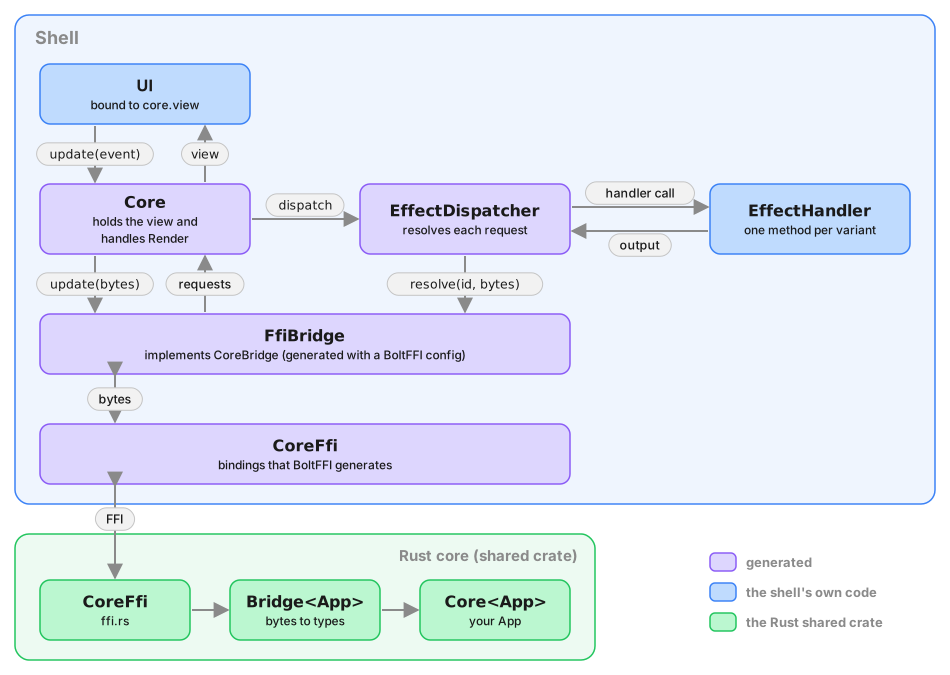
Core talks to the Rust core through a CoreBridge protocol (Swift,
Kotlin, TypeScript) or ICoreBridge interface (C#) with three
byte-level methods. If BoltFFI generates your bindings, tell the codegen
where they are and type generation implements the protocol for you (see
Bridging to BoltFFI below), so a shell constructs
Core from nothing but its EffectHandler. Otherwise — another binding
generator, a test double, a preview — you implement it yourself around
whatever produces the bytes, and hand it to Core with your
EffectHandler:
public protocol CoreBridge: Sendable {
    func update(_ event: [UInt8]) -> [UInt8]
    func resolve(_ id: UInt32, _ output: [UInt8]) -> [UInt8]
    func view() -> [UInt8]
}

@available(macOS 14.0, iOS 17.0, tvOS 17.0, watchOS 10.0, *)
@Observable
@MainActor
public final class Core {
    public private(set) var view: ViewModel
    public init(bridge: any CoreBridge, handler: any EffectHandler)
    public convenience init(handler: any EffectHandler)   // with a BoltFFI config
    public func update(_ event: Event)
    public func process(_ requests: [Request])
    public func process(bytes: [UInt8])
}
interface CoreBridge {
    fun update(event: ByteArray): ByteArray
    fun resolve(id: UInt, output: ByteArray): ByteArray
    fun view(): ByteArray
}

class Core(bridge: CoreBridge, handler: EffectHandler, scope: CoroutineScope) {
    constructor(handler: EffectHandler, scope: CoroutineScope)   // with a BoltFFI config
    val view: StateFlow<ViewModel>
    fun update(event: Event)
    fun process(requests: List<Request>)
    fun process(bytes: ByteArray)
}
export interface CoreBridge {
    update(event: Uint8Array): Uint8Array;
    resolve(id: uint32, output: Uint8Array): Uint8Array;
    view(): Uint8Array;
}

export class Core {
    view: ViewModel;
    constructor(bridge: CoreBridge, handler: EffectHandler,
                onView: (view: ViewModel) => void);
    static create(handler: EffectHandler,                 // with a BoltFFI config
                  onView: (view: ViewModel) => void): Promise<Core>;
    update(event: Event): void;
    process(requests: Request[]): void;
    processBytes(bytes: Uint8Array): void;
}
C# gets ICoreBridge and sealed class Core(ICoreBridge, IEffectHandler),
which implements INotifyPropertyChanged and raises PropertyChanged for
its View property, with Update(Event), Process(IReadOnlyList<Request>)
and Process(byte[]). With a BoltFFI config it also has a
Core(IEffectHandler) constructor.
Things worth knowing:
CoreownsRender. It recognizes the variant carryingcrux_core::render::RenderOperation, re-reads the view from the bridge when one arrives, keeps it inview, and publishes it the way each platform expects:viewis an@Observableproperty in Swift, aStateFlowin Kotlin, anonViewcallback in TypeScript, and aPropertyChangedevent in C#. The initial view is read in the constructor without a notification. BecauseCorehandles it,EffectHandler.renderhas a default that does nothing (a protocol extension in Swift, a default method in Kotlin and C#, an optionalrender?in TypeScript). Implement it only if you driveEffectDispatcherwithoutCore.- The view is held, not just forwarded. That is deliberate: it is
where diff-based view updates will be applied when they arrive, without
changing how you use
Core. process(bytes)is for middleware. A Rust side that pushes effects to the shell asynchronously — theCruxShell.process_effectscallback in the middleware examples — can hand those bytes straight toCore. It tolerates an empty byte array.- Concurrency. The Swift
Coreis@MainActor; the dispatcher's resolve hops back to the main actor before touching the bridge, as the hand-written shells did. The KotlinCoredispatches each request, and processes each resolution, in its own coroutine on the scope you pass. In C#,PropertyChangedmay be raised on a thread-pool thread after an asynchronous request completes, so marshal to your UI thread in the handler. - No
Render, noCore. An effect enum without aRenderOperationvariant has no view loop to own, so only the handler API is emitted for it. - Turning it off.
CodeGenerator::without_core()leaves the handler API in place;without_effect_handlers()turns off both, becauseCoredepends on the dispatcher.
Bridging to BoltFFI
Type generation does not read BoltFFI's output — the two generators are
independent, and the package, module and class names BoltFFI uses are
decisions you made in boltffi.toml and ffi.rs. Repeat them in the
codegen and type generation emits the bridge for you:
let typegen = TypeRegistry::new()
    .register_app::<Weather>()?
    .build()?
    .boltffi(
        BoltFfi::new()
            .swift("Shared")   // the Swift module; the package is at ../Shared
            .kotlin()          // CoreFfi is in the generated package
            .typescript("shared", PackageLocation::Path("../pkg".into()))
            .csharp(),         // CoreFfi is in the generated namespace
    );
Each language is opted in separately; one you do not name gets exactly
the output described above. BoltFfi::class(..) renames the exported
class if yours is not CoreFfi; swift_package(..), kotlin_package(..),
typescript_package(..) and csharp_namespace(..) cover bindings that
live somewhere other than the defaults.
For a named language the generated module gains an FfiBridge —
CoreBridge implemented over CoreFfi, bytes in and bytes out, with the
Swift Data conversion and the @unchecked Sendable declaration where
they belong — and Core gains a constructor that takes only the handler:
let core = Core(handler: WeatherHandler())
val core = Core(handler, CoroutineScope(SupervisorJob() + Dispatchers.Main.immediate))
const core = await Core.create(new WeatherHandler(), setView);
var core = new Core(new CounterHandler());
TypeScript's is an async factory because the wasm module loads
asynchronously: Core.create awaits the package's initialized promise
before touching CoreFfi, which is the one thing every hand-written web
shell had to remember. CoreBridge and the two-argument constructors are
still emitted, so a preview or a test can hand Core a fake, and a shell
whose FFI has a different shape — the middleware examples, whose
CoreFfi::new takes a callback — still writes its own adapter.
Two consequences for the build:
-
Swift.
FfiBridge.swiftimports the BoltFFI module, so the generated package now depends on the BoltFFI package:Package.swiftgains.package(path: "../Shared")and the target depends on its product. SPM requires a dependent package's deployment target to be at least its dependency's, and BoltFFI's package declares one, so give the generated package aplatforms:floor to match through theConfig:Config::builder("App", &out_dir) .platform(".iOS(.v16)") .platform(".macOS(.v13)") .build()Your app target no longer needs to link the BoltFFI package itself; it reaches it through the generated one.
-
TypeScript. The generated
package.jsondepends on the BoltFFI package ("shared": "file:../pkg"), and type generation runspnpm installin the generated package, so runboltffi pack wasmbefore typegen. The Android recipes already pack first; the web recipes in the examples were reordered to match.
Kotlin and C# need nothing else when the bindings share the generated package or namespace, which is how the examples are configured.
Setting boltffi(..) when there is no Core to bridge — no registered
app, no Render variant, or without_core() — is reported as an error
rather than silently ignored.
Shell extensions
A crate can ship source for the shell, in Swift, Kotlin, TypeScript and C#,
embedded in the crate and versioned with it. This is a shell extension, and
type generation copies its source into your generated package when you ask
for it. It does nothing else: the generated EffectHandler,
EffectDispatcher and Core are exactly as described above.
The main use is a capability's shell handler, the shell side of its
protocol. crux_http, crux_kv and crux_time each ship one, as an
implementation of their operations in all four languages.
You ask in the codegen binary, per extension, on the registry before you build it:
let typegen = TypeRegistry::new()
    .register_app::<Weather>()?
    .shell_extension(&crux_http::shell::EXTENSION)?
    .shell_extension(&crux_kv::shell::EXTENSION)?
    .shell_extension(&crux_time::shell::EXTENSION)?
    .build()?;
Each ShellExtension is a static the crate exports behind its
facet_typegen feature. Registering a capability's extension also
registers every operation and output its sources name, including operations
your Effect never carries, because the shipped file implements the whole
capability and so all of its types have to exist. For every extension you
register, and every language it has source for, the generated module gains
one file named after the extension (Http.swift in the Swift target,
Http.kt in the Kotlin package, Http.cs in the C# namespace), with the
module's header prepended and the source otherwise verbatim. TypeScript
modules are a single file, so there the source is appended after the types,
as Core is. A language the extension does not ship gets nothing, and you
implement those methods as you would have anyway.
In Swift, Http.swift declares an HttpHandler protocol with one method
per operation, taking the operation and returning what the generated
EffectHandler method for it returns, and an implementation of it,
URLSessionHttpHandler. Your handler holds an instance and delegates:
struct WeatherHandler: EffectHandler {
    let http = URLSessionHttpHandler.shared
    let time = TaskTimeHandler()

    func http(_ operation: HttpRequest) async -> HttpResult { await http.request(operation) }
    func timeNotifyAfter(_ operation: NotifyAfter) async -> TimerId { await time.notifyAfter(operation) }
    func timeClear(_ operation: Clear) async -> TimerId { await time.clear(operation) }
    // the app's own operations…
}
Those lines are the whole of what you write for the capability. The
protocol rules — how a URLError maps onto HttpResult, what a cleared
timer answers — live in the shipped file, written once by the capability
author. Because the delegation is yours, so is the choice: construct the
shipped implementation with a pinned URLSession or a storage directory,
write your own conformer of the protocol behind a hardened HTTP stack,
override one method and delegate the rest, or leave the registration out
and get a package with nothing extra in it. When a capability gains an
operation, your handler stops compiling until you add its line, which is
the right moment to read what the new operation does.
The other languages follow the same pattern, with each language's own
conventions for the names (C#, for example, prefixes the interface with
I).
Registration is where an extension's manifest dependencies, if it declares
any, reach your Package.swift, build.gradle.kts or package.json. The
bundled capabilities depend on nothing beyond the platform standard
library. An extension lists the top-level names its sources declare
(HttpHandler, IHttpHandler, URLSessionHttpHandler and so on), and
the build fails if one of those is a name the generated shell API uses, a
name the generated module imports from the serialization runtime (such as
Serializer), the name of one of your namespaces, a name another
registered extension declares, or the name of a type registered in the
root namespace. The same goes for a type a capability registers: crux_kv
brings its Delete with it, and an app with a Delete of its own renames
one of them with #[facet(rename = "...")]. The extension's own name only
names its files, so it has to work as a file name (an ASCII letter, then
ASCII letters, digits or _), and two extensions with the same name,
ignoring case, cannot both be registered, because their files would
overwrite each other.
Building capabilities covers the other side: how a capability declares what it ships.
Reading a request id
The id on a Request is not a bare counter. It packs, from the top,
the effect's variant index, one bit saying whether the shell resolves
the request once or many times, and an ascending sequence number. Id 0
is reserved for notifications, on which the core never waits.
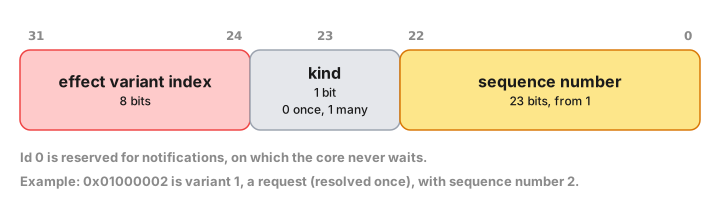
You still resolve with the id exactly as it arrived — the decoder is for logging, tracing and assertions, so that a stray id in a crash report says which effect and which request it belonged to. The layout is an implementation detail of the bridge, which is why the decoder is generated from the same effect metadata the core builds ids from rather than written by hand in each shell:
public enum EffectKind: UInt8, Hashable, Sendable { case render = 0, http = 1 /* ... */ }

public struct RequestId: Hashable, Sendable {
    public init(_ rawValue: UInt32)
    public var rawValue: UInt32 { get }
    public var isNotification: Bool { get }
    public var effectKind: EffectKind? { get }   // nil for a notification
    public var operationKind: OperationKind { get }
    public var sequence: UInt32 { get }
}
Kotlin gets enum class EffectKind(val index: UByte) with an
EffectKind.fromIndex(..) companion and a data class RequestId(val rawValue: UInt) carrying the same four properties. C# gets
enum EffectKind : byte and
public sealed record RequestId(uint RawValue). TypeScript, whose
effect union already discriminates on the variant name, gets
export type EffectKind = "Render" | "Http" | ... and a
decodeRequestId(rawValue: number): RequestId function.
The bridge checks the same structure on the way back in: resolving a
notification's id is reported as "not expected to be resolved", and an
id naming an effect the enum does not have, or disagreeing with the
request its sequence belongs to, is rejected as that rather than as an
unknown id. An effect enum is limited to 256 variants, because the
variant index is eight bits — #[effect] rejects a larger one.
Notes and escape hatches
- The emission is additive. A shell that matches on
Effectand callsresolveby hand keeps working unchanged, which is what Crux's Rust shells do — the Leptos shell matches the enum directly, because in Rust the match is already as precise as a handler interface. - The Swift protocol and dispatcher carry
@available(macOS 10.15, iOS 13.0, tvOS 13.0, watchOS 6.0, *), becauseTask {}needs those versions and the generatedPackage.swiftdeclares noplatforms:. A package that declares its own platforms conforms without repeating the annotation. Note also that the generated operation and output types are notSendable, so a@MainActortype conforming to theSendableEffectHandlerneeds anonisolatedextension — see the iOS chapter. The generatedCoreis@Observable, so it alone carries@available(macOS 14.0, iOS 17.0, tvOS 17.0, watchOS 10.0, *)and the generated file importsObservation; a shell with an older deployment target keeps the handler API and dispatcher, which stay at the lower bar, and drives the loop itself.CoreBridgeisSendable; an adapter around BoltFFI's non-SendableCoreFficlass declares itself@unchecked Sendable, which is sound because the Rust bridge guards its state with mutexes. The generatedFfiBridgecarries that declaration; write it yourself only on an adapter of your own. OperationKind,EffectKind,RequestId,EffectSink,EffectHandler,EffectDispatcher,Core,CoreBridgeandFfiBridge(and their C#I-prefixed forms) are reserved names, and so is every name a registered shell extension declares.TypeRegistry::buildfails if one of your shared types or effect variants claims one.CodeGenerator::without_core()turns offCoreandCoreBridge, and with them the BoltFFI bridge, which is an error to configure alongside it;CodeGenerator::without_effect_handlers()turns off those and the handler API, the kind accessor and the request-id decoder, leaving only the types you registered.- The generated Kotlin module declares a dependency on
kotlinx-coroutines-corein itsbuild.gradle.kts, whichCore'sStateFlowand coroutine launches need. - Operation names collide with standard library types more often than
you'd expect —
crux_kv'sSetshadowsSetin Swift, Kotlin and TypeScript. Alias it at the import site (import com.example.Set as KeyValueSet,import { Set as SetValue }). - Facet type generation requires
facet_generate0.21 or later.