The shell
We've looked at how the Weather app's core fits together, how it's structured into nested state machines, and how managed effects make it testable end-to-end. Time to build the UI around it.
(In practice, you wouldn't write the whole core before touching the UI — you'd go feature by feature. But the shape is the same: a tested core first, then a shell that drives it and handles its effects.)
The shell will have two responsibilities:
- Laying out the UI components, like we've already seen in Part I
- Supporting the app's capabilities. This will be new to us
Like in Part I, you can choose which Shell language you'd like to see this in, but first let's talk about what they all have in common.
Message interface between core and shell
In Part I, we learned to use the update and view APIs of the core. We also learned that
in their raw form, they take serialized values as byte buffers.
We skimmed over the return value of update very quickly. In that case it only ever
returned a request for a RenderOperation - a signal that a new view model is available.
In the Weather's case, more options are possible. Recall the effect type:
#![allow(unused)]
fn main() {
/// Every side-effect the core can ask the shell to perform.
///
/// Each variant carries one operation type, which declares both the single
/// output it is answered with and how many times the shell resolves it — a
/// notification never, a request exactly once. The
/// `#[effect(facet_typegen)]` macro generates the FFI glue, and type
/// generation turns this enum into the shell's `EffectHandler`. The app lists
/// only the operations it uses, so the shell is never asked to implement a
/// key-value `ListKeys` it will never see.
#[effect(facet_typegen)]
pub enum Effect {
    /// Ask the shell to re-read the [`ViewModel`](crate::ViewModel) and
    /// repaint.
    Render(RenderOperation),
    /// Perform an HTTP request — weather and geocoding API calls.
    Http(HttpRequest),
    /// Read the favourites list from the shell's key-value store.
    KvGet(kv::Get),
    /// Write the favourites list to the shell's key-value store.
    KvSet(kv::Set),
    /// Schedule a timer — used to debounce the search input on the
    /// add-favourite screen.
    TimeNotifyAfter(time::NotifyAfter),
    /// Release a timer the core no longer cares about.
    TimeClear(time::Clear),
    /// Ask whether location services are enabled.
    IsLocationEnabled(IsLocationEnabled),
    /// Ask for the device's coordinates.
    GetLocation(GetLocation),
    /// Fetch a secret (the OpenWeatherMap API key).
    FetchSecret(Fetch),
    /// Store a secret.
    StoreSecret(Store),
    /// Delete a secret.
    DeleteSecret(Delete),
}
}
Those are the eleven possible variants we'll see in the return from update —
one per operation the app can ask for. It is essentially telling us "I did the
state update, and here are some side-effects for you to perform".
Let's say that the effect is an HTTP request. We execute it, get a response, and
what do we do then? Well, that's what the third core API, resolve, is for:
#![allow(unused)]
fn main() {
pub fn update(data: &[u8]) -> Vec<u8>
pub fn resolve(id: u32, data: &[u8]) -> Vec<u8>
pub fn view() -> Vec<u8>
}
Each effect request comes with an identifier. We use resolve to return the
output of the effect back to the app, alongside the identifier, so that it can
be paired correctly.
How many times to resolve
resolve raises a question the shell has to get right, and the answer is not
in the bytes: how many times does this effect get resolved?
- Some effects are notifications.
Renderis the obvious one — the core is telling the shell something and is not waiting for an answer. Resolving one is an error, because the core kept no record of the request. - Most are requests, resolved exactly once, with the operation's output.
- Some are streams, resolved once per item, for as long as the subscription lives.
Because each operation declares its kind in Rust, type generation
can tell the shell. Every generated Effect gains an operationKind accessor
(effectOperationKind(effect) in TypeScript), and — more usefully — an
EffectHandler protocol/interface with one method per variant, whose signature
is the answer:
- a notification's method returns nothing;
- a request's method returns the operation's output (
async/suspend/Promise/Task), and the generatedEffectDispatcherresolves the request with it, once; - a stream's method is handed an
EffectSink<Output>, and eachsendresolves the request again.
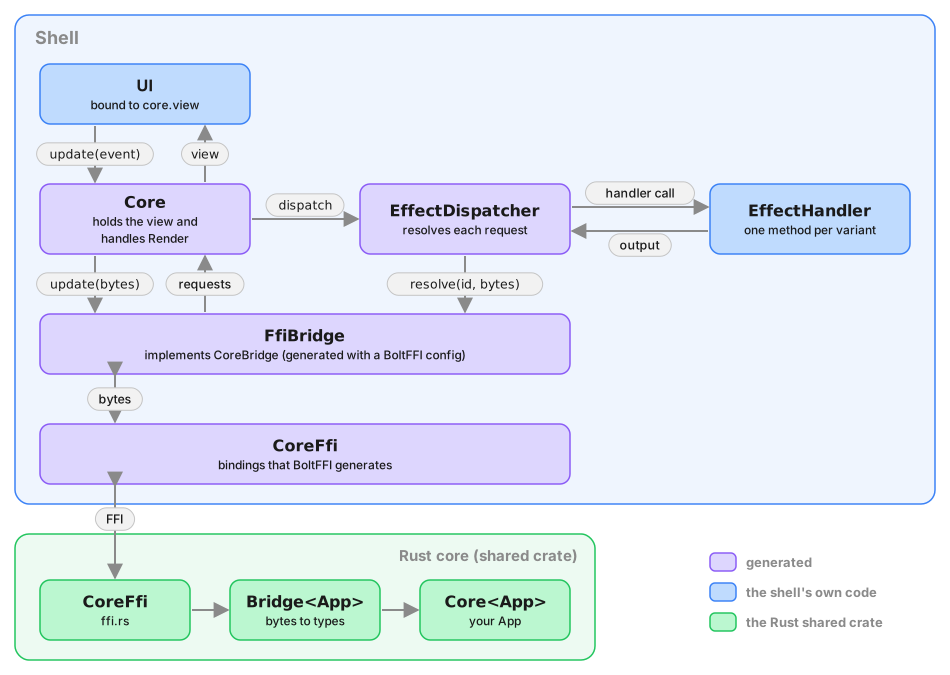
A shell that implements the handler and lets EffectDispatcher do the
resolving cannot resolve the wrong number of times or with the wrong type,
because there is no resolve call left for it to get wrong. If you drive the
dispatcher yourself, its resolve argument is your own callback around the
core's resolve FFI.
Who drives the loop
You don't have to. Once the dispatcher does the resolving, what remains of the
shell's core loop is the same in every app: serialize the Event, call the
core's update, deserialize the requests, re-read the view when a Render
arrives, hand everything else to the dispatcher, and when a request is
resolved call the core's resolve and loop over the requests that returns.
Type generation knows every type in that loop, so it emits it too, as a
Core class, together with a CoreBridge protocol over bytes — update,
resolve and view — that the shell satisfies with a few lines around the
BoltFFI bindings.
With the generated Core, a shell writes two things: the bridge adapter and
the EffectHandler. Core handles Render itself and hands the new view to
a callback (Swift, TypeScript, C#) or publishes it on a StateFlow (Kotlin),
so the handler never touches the view at all. See
the generated Core for the exact
shape in each language, and the RFC for why it
is built the way it is.
If you do resolve by hand, the id you pass back is the one that arrived,
untouched. It is not a bare
counter, though: it names the effect, says whether the request is resolved once
or many times, and carries a sequence number, and type generation emits an
EffectKind enum and a RequestId decoder for reading it — useful in a log
line, never needed to resolve. See
reading a request id.
Three of the shells that follow hand the loop to the generated Core. The
Leptos shell doesn't:
core and shell are both Rust there, so it matches on the Effect enum
directly, which is just as precise and needs no generated code. Matching by
hand is still supported everywhere — the generated handler API is additive.
Let's look at how this works in practice.
Platforms
You can continue with your platform of choice: