Managed Effects
It's time to get the Weather app to actually fetch some weather information and let us store some favourites. And for that, we will need to interact with the outside world - we will need to perform side-effects.
As we mentioned before, the approach to side-effects Crux uses is sometimes called managed side-effects. Your app's core is not allowed to perform side-effects directly. Instead, whenever it wants to interact with the outside world, it needs to request the interaction from the shell.
It's not quite enough to do one side-effect at a time, however. In our weather app example we may want to load the list of favourite locations in parallel with checking the current location. We may also want to run a sequence, such as checking whether location services are enabled, then fetching a location if they are.
The abstraction Crux uses to capture the potentially complex orchestration of effects
in response to an event is a type called Command.
Think of your whole app as a robot, where the Core is the brain of the robot and the Shell is the body of the robot. The brain instructs the body through commands and the body passes information about the outside world back to it with Events.
In this chapter we will explore how commands are created and used; we'll come back to capabilities, which provide a convenient way to create common commands, in chapter 7.
Note on intent and execution
Managed effects are the key to Crux being portable across as many platforms as is sensible. Crux apps are, in a sense, built in the abstract, they describe what should happen in response to events, but not how it should happen. We think this is important both for portability, and for testing and general separation of concerns. What should happen is inherent to the product, and should behave the same way on any platform – it's part of what your app is. How it should be executed (and exactly what it looks like) often depends on the platform.
Different platforms may support different ways, for example a biometric authentication may work very differently on various devices and some may not even support it at all. Different platforms may also have different practical restrictions: while it may be perfectly appropriate to write things to disk on one platform, internet access can't be guaranteed (e.g. on a smart watch); on another, writing to disk may not be possible, but internet connection is virtually guaranteed (e.g. in an API service, or on an embedded device in a factory). The specific storage solution for persistent caching would be implemented differently on different platforms, but would potentially share the key format and eviction strategy across them.
The hard part of designing effects is working out exactly where to draw the line between what is the intent and what is the implementation detail, what's common across platforms and what may be different on each, and implementing the former in Rust as a set of types, and the latter on the native side in the Shell, however is appropriate.
Because Effects define the "language" used to express intent, your Crux application code can be portable onto any platform capable of executing the intent in some way. Clearly, the number of different effects we can think of, and platforms we can target is enormous, and Crux doesn't want to force you to implement the entire portfolio of them on every platform.
Instead, your app is expected to define an Effect type which covers the kinds of
effects which your app needs in order to work, and every time it responds to an Event,
it is expected to return a Command.
Here is the Weather app's Effect type:
#![allow(unused)]
fn main() {
/// Every side-effect the core can ask the shell to perform.
///
/// Each variant carries one operation type, which declares both the single
/// output it is answered with and how many times the shell resolves it — a
/// notification never, a request exactly once. The
/// `#[effect(facet_typegen)]` macro generates the FFI glue, and type
/// generation turns this enum into the shell's `EffectHandler`. The app lists
/// only the operations it uses, so the shell is never asked to implement a
/// key-value `ListKeys` it will never see.
#[effect(facet_typegen)]
pub enum Effect {
    /// Ask the shell to re-read the [`ViewModel`](crate::ViewModel) and
    /// repaint.
    Render(RenderOperation),
    /// Perform an HTTP request — weather and geocoding API calls.
    Http(HttpRequest),
    /// Read the favourites list from the shell's key-value store.
    KvGet(kv::Get),
    /// Write the favourites list to the shell's key-value store.
    KvSet(kv::Set),
    /// Schedule a timer — used to debounce the search input on the
    /// add-favourite screen.
    TimeNotifyAfter(time::NotifyAfter),
    /// Release a timer the core no longer cares about.
    TimeClear(time::Clear),
    /// Ask whether location services are enabled.
    IsLocationEnabled(IsLocationEnabled),
    /// Ask for the device's coordinates.
    GetLocation(GetLocation),
    /// Fetch a secret (the OpenWeatherMap API key).
    FetchSecret(Fetch),
    /// Store a secret.
    StoreSecret(Store),
    /// Delete a secret.
    DeleteSecret(Delete),
}
}
Eleven variants, one per operation the app can ask for: rendering the UI, an HTTP request, reading and writing the key-value store, starting and clearing a timer, two location questions, and three secret operations. To add a new kind of effect, you extend this enum.
Note that the enum names operations, not capabilities. crux_kv offers five operations and this app uses two, so the shell is only ever asked to serve KvGet and KvSet. Each variant carries an operation type that declares its own output and how many times the shell resolves it — which is what lets the shell code be generated, and checked, per variant.
What is a Command
The Command is a recipe for a side-effects workflow which may perform several effects and also send events back to the app.
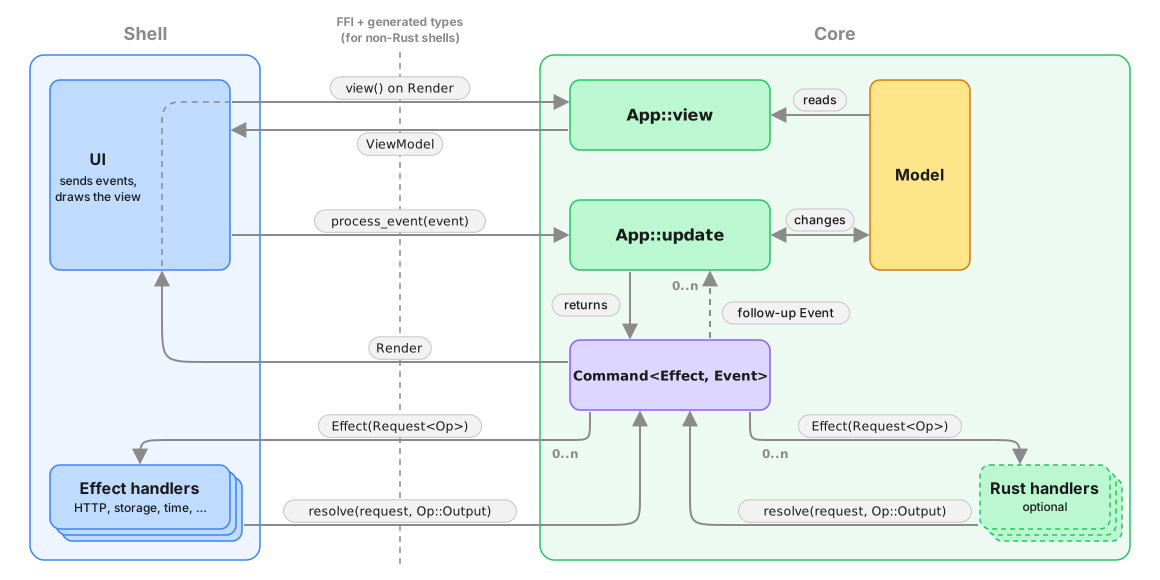
Crux expects a Command to be returned by the update function. A basic Command will result in an effect request to the Shell, and when the request is resolved by the Shell, the Command will pass the output to the app in an Event. The interaction can be more complicated than this, however. You can imagine a command running a set of Effects concurrently (say a few http requests and a timer), then follow some of them with additional effects based on their outputs, and finally send an event with the result of some of the outputs combined. So in principle, Command is a state machine which emits effects (for the Shell) and Events (for the app) according to the internal logic of what needs to be accomplished.
Command provides APIs to iterate over the effects and events emitted so far. This API can be used both in tests and in Rust-based shells, and for some advanced use cases when composing applications.
Effects and Events
Let's look closer at Effects. Each effect carries a request for an Operation (e.g. a HTTP request), which can be inspected and resolved with an operation output (e.g. a HTTP response). After effect requests are resolved, the command may have further effect requests or events, depending on the recipe it's executing.
Types acting as an Operation must implement the crux_core::capability::Operation trait, which ties them to the type of output and to an operation kind — how many times the request expects to be resolved: never (a notification), exactly once (a request), or any number of times (a stream). In practice you declare all of that with #[derive(Operation)], which we'll come to in chapter 7. These two types are the protocol between the core and the shell when requesting and resolving the effects. The other types involved in the exchange are various wrappers to enable the operations to be defined in separate crates. The operation is first wrapped in a Request, which can be resolved, and then again with an Effect, like we saw above. This allows multiple Operation types from different crates to coexist, and also enables the Shells to "dispatch" to the right implementation to handle them.
The Effect type is typically defined with the help of the #[effect] macro. Here is the Weather app's effect again:
#![allow(unused)]
fn main() {
/// Every side-effect the core can ask the shell to perform.
///
/// Each variant carries one operation type, which declares both the single
/// output it is answered with and how many times the shell resolves it — a
/// notification never, a request exactly once. The
/// `#[effect(facet_typegen)]` macro generates the FFI glue, and type
/// generation turns this enum into the shell's `EffectHandler`. The app lists
/// only the operations it uses, so the shell is never asked to implement a
/// key-value `ListKeys` it will never see.
#[effect(facet_typegen)]
pub enum Effect {
    /// Ask the shell to re-read the [`ViewModel`](crate::ViewModel) and
    /// repaint.
    Render(RenderOperation),
    /// Perform an HTTP request — weather and geocoding API calls.
    Http(HttpRequest),
    /// Read the favourites list from the shell's key-value store.
    KvGet(kv::Get),
    /// Write the favourites list to the shell's key-value store.
    KvSet(kv::Set),
    /// Schedule a timer — used to debounce the search input on the
    /// add-favourite screen.
    TimeNotifyAfter(time::NotifyAfter),
    /// Release a timer the core no longer cares about.
    TimeClear(time::Clear),
    /// Ask whether location services are enabled.
    IsLocationEnabled(IsLocationEnabled),
    /// Ask for the device's coordinates.
    GetLocation(GetLocation),
    /// Fetch a secret (the OpenWeatherMap API key).
    FetchSecret(Fetch),
    /// Store a secret.
    StoreSecret(Store),
    /// Delete a secret.
    DeleteSecret(Delete),
}
}
The eleven operations it carries come from six different Capabilities — Render, crux_http, crux_kv, crux_time, and the app's own Location and Secret — so let's talk about those.
Capabilities
Capabilities are developer-friendly, ergonomic APIs to construct commands, from very basic ones all the way to complex stateful orchestrations. Capabilities are an abstraction layer that bundles related operations together with code to create them, and cover one kind of a side-effect (e.g. HTTP, or timers).
We will look at writing capabilities in chapter 7, but for now, it's useful to know that their API often doesn't return Commands straight away, but instead returns command builders, which can be converted into a Command, or converted into a future and used in an async context.
To help that make more sense, let's look at how Commands are typically used.
Working with Commands
The command API aims to cover most effect orchestration without asking developers to use async Rust. We'll come to async in a minute; first, let's look at what can be done without it.
A typical use of a Command in an update function will look something like this:
Http::get(API_URL)
    .expect_json()
    .build()
    .then_send(Event::ReceivedResponse),
This code is using a HTTP capability and its API up to the .build() call which returns a CommandBuilder. This is a lot like a Future – its type carries the output type, and it represents the eventual result of the effect. The difference is that it can be converted either into a Command or into a Future to be used in an async context. In this case, the .then_send part is building the command by binding it to an Event to send the output of the request back to the app.
Here's an example of the same from the Weather app:
#![allow(unused)]
fn main() {
        let fetch_favorites = KeyValue::get(FAVORITES_KEY)
            .then_send(|r| Event::Initializing(InitializingEvent::FavoritesLoaded(r)));
}
The get() call again returns a command builder, which is used to create a command with .then_send(). The Command is now fully baked and bound to the specific callback event, and can no longer be meaningfully chained into an "effect pipeline".
One special, but common case of creating a command is creating a Command which does nothing, because there are no more side-effects:
#![allow(unused)]
fn main() {
Command::done()
}
Soon enough, your app will get a little more complicated, you will need to run multiple commands concurrently, but your update function only returns a single value. To get around this, you can combine existing commands into one using either the all function, or the .and method.
We've seen an example of this already, but here it is again:
#![allow(unused)]
fn main() {
    pub(crate) fn start() -> Started<Self, Event> {
        tracing::debug!("starting initialization, fetching API key and favorites");

        let fetch_secret = secret::command::fetch(secret::API_KEY_NAME)
            .then_send(|r| Event::Initializing(InitializingEvent::SecretFetched(r)));
        let fetch_favorites = KeyValue::get(FAVORITES_KEY)
            .then_send(|r| Event::Initializing(InitializingEvent::FavoritesLoaded(r)));

        Started::new(
            Self::default(),
            Command::all([fetch_secret, fetch_favorites]),
        )
    }
}
The two capability calls each produce a command, and we want to run them concurrently. Command::all combines them into a single Command, which start() returns as part of its Started bundle.
Commands (or more precisely command builders) can be created without capabilities. That's what capabilities do internally. You shouldn't really need this in your app code, so we will cover that side of Commands in chapter 7, when we look at building Capabilities.
You might also want to run effects in a sequence, passing output of one as the input of another. This is another thing the command builders can facilitate. Let's look at that.
Command builders
Command builders come in three flavours:
- RequestBuilder - the most common, builds a request expecting a single response from the shell (think HTTP client)
- StreamBuilder - builds a request expecting a (possibly infinite) sequence of responses from the shell (think WebSockets)
- NotificationBuilder - builds a shell notification, which does not expect a response. The best example is notifying the shell that a new view model is available
Those three flavours are exactly the three kinds an operation declares, so which builder you get is decided by the operation rather than by the call site: Command::request_from_shell only accepts an operation declared request, and so on for the other two. Passing the wrong one is a compile error.
All builders share a common API. Request and stream builder can be converted into commands with a .then_send.
Both also support .then_request and .then_stream calls, for chaining on a function which takes the output of the first builder and returns a new builder. This can be used to build things like automatic pagination through an API for example.
You can also .map the output of the request/stream to a new value.
Here's an example of a more complicated chaining from the Command test suite:
#![allow(unused)]
fn main() {
#[test]
fn complex_concurrency() {
    fn increment(output: AnOperationOutput) -> AnOperation {
        let AnOperationOutput::Other([a, b]) = output else {
            panic!("bad output");
        };

        AnOperation::More([a, b + 1])
    }

    let mut cmd = Command::all([
        Command::request_from_shell(AnOperation::More([1, 1]))
            .then_request(|out| Command::request_from_shell(increment(out)))
            .then_send(Event::Completed),
        Command::request_from_shell(AnOperation::More([2, 1]))
            .then_request(|out| Command::request_from_shell(increment(out)))
            .then_send(Event::Completed),
    ])
    .then(Command::request_from_shell(AnOperation::More([3, 1])).then_send(Event::Completed));

// ... the assertions are omitted for brevity, see crux_core/src/command/tests/combinators.rs
}
Forgive the abstract nature of the operations involved, these constructions are relatively uncommon in real code, and have not been used anywhere in our example code yet.
For more details of this, we recommend the Command API docs.
Combining all these tools provides a fair bit of flexibility to create fairly complex orchestrations of effects. Sometimes, you might want to go more complex than that, however. In such cases, Crux attempting to create more APIs trying to achieve every conceivable orchestration with closures would have diminishing returns. In such cases, you probably just want to write async code instead.
Notice that nowhere in the above examples have we mentioned working with the model during the execution of the command. This is very much by design: Once started, commands do not have model access, because they execute asynchronously, possibly in parallel, and access to model would introduce data races, which are very difficult to debug.
In order to update state, you should pass the result of the effect orchestration back to your app using an Event (as a kind of callback). It's relatively typical for apps to have a number of "internal" events, which handle results of effects. Sometimes these are also useful in tests, if you want to start a particular journey "from the middle".
Commands with async
The real power of commands comes from the fact that they build on async Rust. Each Command is a little async executor, which runs a number of tasks. The tasks get access to the crux context (represented by CommandContext), which gives them the ability to communicate with the shell and with the app.
You can create a raw command like this:
Command::new(|ctx| async move {
    let output = ctx.request_from_shell(One).await;
    ctx.send_event(Event::Completed(output));
    let output = ctx.request_from_shell(Two).await;
    ctx.send_event(Event::Completed(output));
});(One and Two here are two operation types, each with its own output — see chapter 7. The type of output differs between the two .awaits, and the compiler knows which is which.)
Command::new takes a closure, which receives the CommandContext and returns a future, which will become the Command's main task (it is not expected to return anything, its Output is (). The provided context can be used to start shell requests, streams, and send events back to the app.
The Context can also be used to spawn more tasks in the command.
There is a very similar async API in command builders too, except the returned future/stream is expected to return a value.
Builders can be converted into a future/stream for use in the async blocks with .into_future(ctx) and .into_stream(ctx), so long as you hold an instance of a CommandContext (otherwise those futures/streams would have no ability to communicate with the shell or the app).
While commands do execute on an async runtime, the runtime does not run on its own - it's part of the core and needs to be driven by the Shell calling the Core APIs. We use async rust as a convenient way to build the cooperative multi-tasking state machines involved in managing side effects.
This is also why combining the Crux async runtime with something like Tokio will appear to somewhat work (because the futures involved are mostly compatible), but it will have odd stop-start behaviours, because the Crux runtime doesn't run all the time, and some futures won't work, because they require specific Tokio support.
That said, a lot of universal async code (like async channels for example), work just fine.
Cancelling commands
Commands can be cancelled using an AbortHandle. Call cmd.abort_handle() to get
a handle, store it in your model, and call handle.abort() later to cancel all
tasks in the command. This is useful for things like cancelling an in-flight search
when the user types a new query.
// In one event handler, start a command and store its abort handle
let mut cmd = Http::get(url).expect_json().build().then_send(Event::Response);
model.search_handle = Some(cmd.abort_handle());
return cmd;

// In a later event handler, cancel the previous command
if let Some(handle) = model.search_handle.take() {
    handle.abort();
}
There is more to the async effect API than we can or should cover here. Most of what you'd expect in async rust is supported – join handles, aborting tasks (and even Commands), spawning tasks and communicating between them, etc. Again, we recommend the Command API docs for the full coverage.
Migrating from previous versions of Crux
If you're new to Crux, it's unlikely you need to read this section. The original API for side-effects was very different from Commands and this section is kept to help migrate from that API
The change to Command is a breaking one for all Crux apps. The previous API used Capabilities to perform side-effects via callbacks. The new API removes Capabilities and caps from the App trait entirely, replacing them with a Command return value from update.
There are three parts to the migration:
- Remove the
Capabilitiesassociated type and thecapsparameter fromupdate - Declare the
Effectassociated type on your App - Return
Commandfromupdate
Here's what the end state looks like:
#![allow(unused)]
fn main() {
impl crux_core::App for App {
    type Event = Event;
    type Model = Model;
    type ViewModel = ViewModel;
    type Effect = Effect;

    fn update(
        &self,
        event: Event,
        model: &mut Model,
    ) -> crux_core::Command<Effect, Event> {
        crux_core::Command::done() // return a Command
    }
}
}
To begin with, you can return Command::done() (a no-op) from update and
incrementally migrate your effect handling to use Commands and capability APIs
that return command builders.